![Logo_YUKKA_News-Analytics_WEISS_Transparent.png]](https://9431966.hs-sites-eu1.com/hs-fs/hubfs/Logo_YUKKA_News-Analytics_WEISS_Transparent.png?height=40&name=Logo_YUKKA_News-Analytics_WEISS_Transparent.png)
Benchmark - a news view feature used for company comparison
In the right corner of the Cockpit, of the Views section, the Benchmark View is presented as  . Click on the icon and it will display the companies or the selection of entities you can choose from to start you comparison.
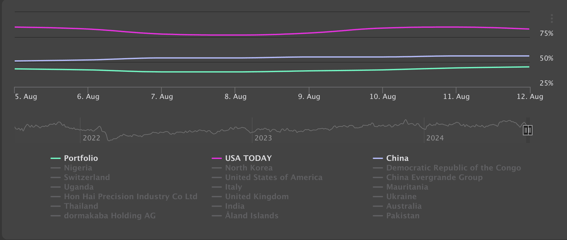
Once you are done, you can Export the Chart results in different formats by just clicking on the three dots in the upper right corner of your Benchmark Chart. This feature will provide you with various options to choose from.
For example, there is a handy Full Screen mode, if you wish to take a more detailed look into the chart.