![Logo_YUKKA_News-Analytics_WEISS_Transparent.png]](https://9431966.hs-sites-eu1.com/hs-fs/hubfs/Logo_YUKKA_News-Analytics_WEISS_Transparent.png?height=40&name=Logo_YUKKA_News-Analytics_WEISS_Transparent.png)
Document Categories serve as another way to break down the news according to your news.
You can easily select or deselect certain types of news, based on the Document Category assigned to it.
Or in a clearer way to put it: You only want financial news, select the Filter accordingly and you will only see news that are marked with that document category.
You can select the document category in the filter settings:
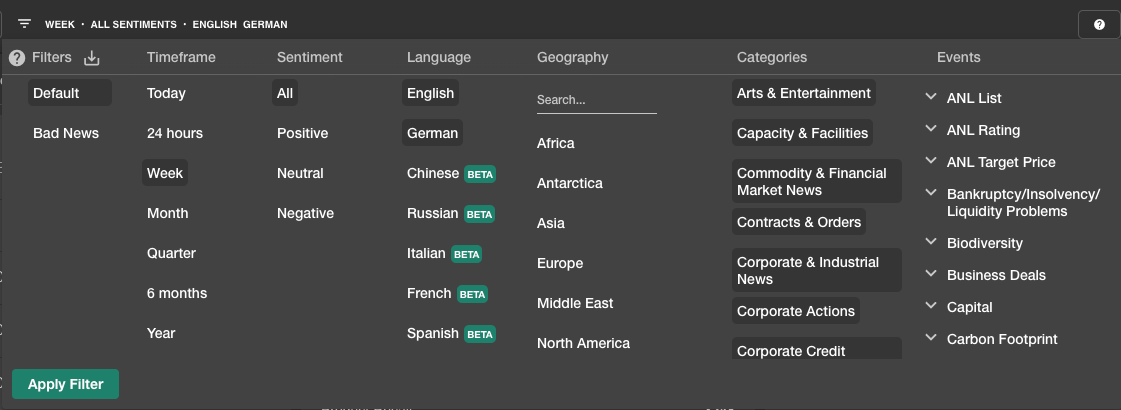
Its an Opt-In System, so only selected categories will be shown.
If you don't want to see documents of a certain category, please just deselect it from the list.
Full list of available document categories:
Arts & Entertainment
Capacity & Facilities
Commodity & Financial Market News
Contracts & Orders
Corporate & Industrial News
Corporate Actions
Corporate Credit Ratings
Corporate Crime & Legal Action
Corporate Funding
Crime & Legal Action
Cryptocurrency Markets
Disasters & Accidents
Domestic & Foreign Markets
Economic News
Education
Financial Performance
General Labor Issues
Health
Industry Profile
Intellectual Property Rights
Labor & Personnel
Living & Lifestyle
Management
Market Research
Marketing
National & Public Security
Natural Environment
Ownership Changes
Personal Finance
Political & General News
Politics & International Relations
Products & Services
Profiles Of Companies
Regulation & Government Policy
Research & Development
Risk News
Sciences & Humanities
Securities Filings
Society & Community
Sports
Transport
Weather