![Logo_YUKKA_News-Analytics_WEISS_Transparent.png]](https://9431966.hs-sites-eu1.com/hs-fs/hubfs/Logo_YUKKA_News-Analytics_WEISS_Transparent.png?height=40&name=Logo_YUKKA_News-Analytics_WEISS_Transparent.png)
It's very likely that there will be a point where the information in a portfolio has to be shared.
There is more than one way to do it, but by far the easiest one is "sharing" the portfolio.
In order to do so, please click on the pencil in the portfolios nametag:

This will open a menu that will look like this:
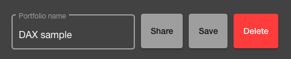
Select "Share".
This will open a settings window:
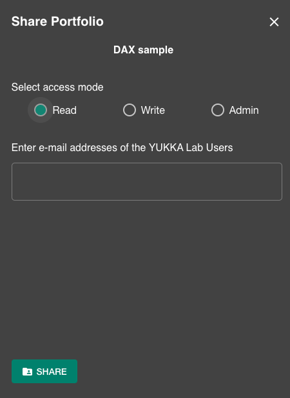
Two settings have to be made:
First you have to decide what kind of access you want to share:
- Read - will grant the recipient "Read only access"
- Write - will give the recipient "Write" access, which will enable him to make annotations and comments in the portfolio.
- Admin - will grant the recipient Admin access, which enables him to do all changes he wants to do to the portfolio
Then you enter the email address ot the portfolios recipient and confirm the sharing with "Share".
Important:
Please be aware that you can only share portfolios with an active YukkaLab user.
You will receive a notification in the lower part of the screen if the sharing was successful.
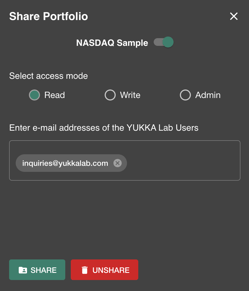
You now have an option to "unshare" the portfolio if required. There also is a switch now in the upper part of the sharing window, that can disable the sharing:
There is also another way of sharing your portfolio by exporting its data and importing in another account.
Please refer to the Help Centre article on how to do that.